<?xml version="1.0" encoding="UTF-8"?><rss version="2.0"
	xmlns:content="http://purl.org/rss/1.0/modules/content/"
	xmlns:wfw="http://wellformedweb.org/CommentAPI/"
	xmlns:dc="http://purl.org/dc/elements/1.1/"
	xmlns:atom="http://www.w3.org/2005/Atom"
	xmlns:sy="http://purl.org/rss/1.0/modules/syndication/"
	xmlns:slash="http://purl.org/rss/1.0/modules/slash/"
	>

<channel>
	<title>speedtest.net &#8211; Sezer YAMAN</title>
	<atom:link href="https://sezeryaman.com/etiket/speedtest-net/feed/" rel="self" type="application/rss+xml" />
	<link>https://sezeryaman.com</link>
	<description>Yazılım Geliştirici</description>
	<lastBuildDate>Tue, 31 Oct 2017 12:01:46 +0000</lastBuildDate>
	<language>tr</language>
	<sy:updatePeriod>
	hourly	</sy:updatePeriod>
	<sy:updateFrequency>
	1	</sy:updateFrequency>
	<generator>https://wordpress.org/?v=6.9.4</generator>
	<item>
		<title>centos&#8217;da ssh&#8217;dan speedtest.net ile hız testini sorgulama</title>
		<link>https://sezeryaman.com/centosda-sshdan-speedtest-net-ile-hiz-testini-sorgulama/</link>
					<comments>https://sezeryaman.com/centosda-sshdan-speedtest-net-ile-hiz-testini-sorgulama/#respond</comments>
		
		<dc:creator><![CDATA[szrymn]]></dc:creator>
		<pubDate>Tue, 31 Oct 2017 12:01:46 +0000</pubDate>
				<category><![CDATA[centos]]></category>
		<category><![CDATA[linux]]></category>
		<category><![CDATA[hız testi]]></category>
		<category><![CDATA[sorgulama]]></category>
		<category><![CDATA[speed test]]></category>
		<category><![CDATA[speedtest.net]]></category>
		<category><![CDATA[ssh]]></category>
		<guid isPermaLink="false">https://sezeryaman.com/?p=24</guid>

					<description><![CDATA[Linux işletim sistemlerinde text ekranında tarayıcıya ulaşıp adres satırına speedtest.net yazıp direkt hız testini sorgulama gibi bir imkanımız olmadığından dolayı, bunu kodlarla yapmamızı sağlayan modülü kurmasını ve kullanımına bi bakalım&#8230; wget wget https://raw.githubusercontent.com/sivel/speedtest-cli/master/speedtest.py chmod a+rx speedtest.py sudo mv speedtest.py /usr/local/bin/speedtest-cli sudo chown root:root /usr/local/bin/speedtest-cli ssl sertifikasından dolayı hata verir ve kurulum dosyasını çekemezsek üstteki komutların &#8230; <a href="https://sezeryaman.com/centosda-sshdan-speedtest-net-ile-hiz-testini-sorgulama/" class="more-link">Okumaya devam et<span class="screen-reader-text"> "centos&#8217;da ssh&#8217;dan speedtest.net ile hız testini sorgulama"</span></a>]]></description>
										<content:encoded><![CDATA[<p>Linux işletim sistemlerinde text ekranında tarayıcıya ulaşıp adres satırına speedtest.net yazıp direkt hız testini sorgulama gibi bir imkanımız olmadığından dolayı, bunu kodlarla yapmamızı sağlayan modülü kurmasını ve kullanımına bi bakalım&#8230;</p>
<pre class="lang:sh decode:true ">wget wget https://raw.githubusercontent.com/sivel/speedtest-cli/master/speedtest.py
chmod a+rx speedtest.py
sudo mv speedtest.py /usr/local/bin/speedtest-cli
sudo chown root:root /usr/local/bin/speedtest-cli</pre>
<p>ssl sertifikasından dolayı hata verir ve kurulum dosyasını çekemezsek üstteki komutların 1. satırındaki yerine aşağıdakini yazın</p>
<pre class="lang:sh decode:true ">wget https://raw.github.com/sivel/speedtest-cli/master/speedtest.py --no-check-certificate</pre>
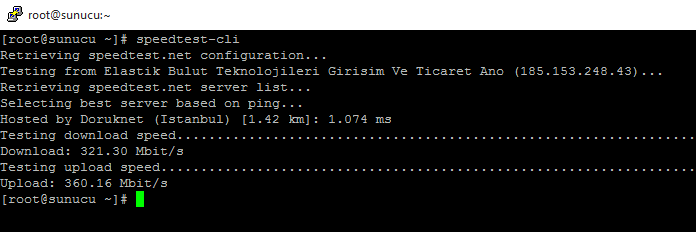
<p>kurulumu tamamladıktan sonra <strong>speedtest-cli</strong> kodu ile hız testimizi sorgulatabiliriz, örnek çıktı aşağıdaki gibi olacaktır.</p>
<figure id="attachment_25" aria-describedby="caption-attachment-25" style="width: 696px" class="wp-caption alignnone"><img fetchpriority="high" decoding="async" class="size-full wp-image-25" src="https://sezeryaman.com/wp-content/uploads/2017/10/ssh-speed-test.png" alt="ssh speed test" width="696" height="232" srcset="https://sezeryaman.com/wp-content/uploads/2017/10/ssh-speed-test.png 696w, https://sezeryaman.com/wp-content/uploads/2017/10/ssh-speed-test-300x100.png 300w" sizes="(max-width: 709px) 85vw, (max-width: 909px) 67vw, (max-width: 984px) 61vw, (max-width: 1362px) 45vw, 600px" /><figcaption id="caption-attachment-25" class="wp-caption-text">ssh speed test</figcaption></figure>
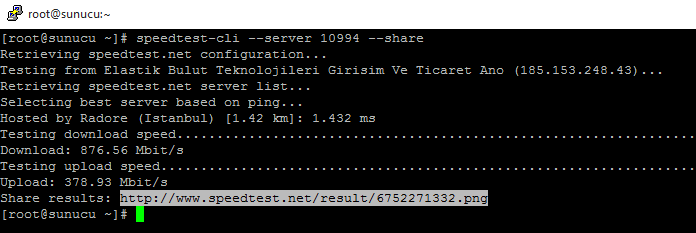
<p>eğer farklı lokasyonda test yapmak isterseniz</p>
<pre class="lang:sh decode:true">speedtest-cli --server 10994</pre>
<p>buradaki 10994 olan Radore&#8217;nin server id&#8217;si oluyor, speedtest&#8217;e kayıtlı olan bütün sunucuların id&#8217;sine şuradan ulaşabilirsiniz: <a href="https://www.speedtest.net/speedtest-servers.php">https://www.speedtest.net/speedtest-servers.php</a></p>
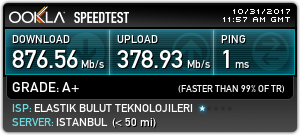
<p>Hız testinizin sonucunu görsel olarak almak isterseniz sorgunun sonuna <strong>&#8211;share </strong>eklemeniz yeterli olacaktır.</p>
<pre class="lang:sh decode:true">speedtest-cli --server 10994 --share</pre>
<figure id="attachment_26" aria-describedby="caption-attachment-26" style="width: 696px" class="wp-caption alignnone"><img decoding="async" class="size-full wp-image-26" src="https://sezeryaman.com/wp-content/uploads/2017/10/radore.png" alt="radore serverinde speedtest sonucu" width="696" height="233" srcset="https://sezeryaman.com/wp-content/uploads/2017/10/radore.png 696w, https://sezeryaman.com/wp-content/uploads/2017/10/radore-300x100.png 300w" sizes="(max-width: 709px) 85vw, (max-width: 909px) 67vw, (max-width: 984px) 61vw, (max-width: 1362px) 45vw, 600px" /><figcaption id="caption-attachment-26" class="wp-caption-text">radore serverinde speedtest sonucu</figcaption></figure>
<figure id="attachment_27" aria-describedby="caption-attachment-27" style="width: 300px" class="wp-caption alignnone"><img decoding="async" class="size-full wp-image-27" src="https://sezeryaman.com/wp-content/uploads/2017/10/6752271332.png" alt="speedtest.net görsel sonucu" width="300" height="135" /><figcaption id="caption-attachment-27" class="wp-caption-text">speedtest.net görsel sonucu</figcaption></figure>
]]></content:encoded>
					
					<wfw:commentRss>https://sezeryaman.com/centosda-sshdan-speedtest-net-ile-hiz-testini-sorgulama/feed/</wfw:commentRss>
			<slash:comments>0</slash:comments>
		
		
			</item>
	</channel>
</rss>