#wpdesk_tracker_connect{margin-top:30px}#wpdesk_tracker_connect .wpdesk-logo{background-image:url(../images/logo.png);background-repeat:no-repeat;background-size:215px 62px;display:block;height:62px;margin:0 auto;width:215px}@media (-webkit-min-device-pixel-ratio: 2),(min-resolution: 192dpi){#wpdesk_tracker_connect .wpdesk-logo{background-image:url(../images/logo@2x.png);background-size:215px 62px}}#wpdesk_tracker_connect .message p{font-size:14px}#wpdesk_tracker_connect .plugin-card-bottom{border-bottom:1px solid #ddd;margin-bottom:10px}#wpdesk_tracker_connect .button-allow{float:right}#wpdesk_tracker_connect .permissions .trigger{display:block;font-size:.9em;text-align:center;margin-bottom:10px;text-decoration:none}#wpdesk_tracker_connect .permissions .permissions-details{height:0;overflow:hidden;margin:0}#wpdesk_tracker_connect .permissions.open .permissions-details{height:auto;padding:10px 20px}#wpdesk_tracker_connect .permissions ul{margin:0}#wpdesk_tracker_connect .permissions ul li{margin-bottom:12px}#wpdesk_tracker_connect .permissions ul li i.dashicons{float:left;font-size:40px;width:40px;height:40px}#wpdesk_tracker_connect .permissions ul li div{margin-left:55px}#wpdesk_tracker_connect .permissions ul li div span{font-weight:bold}#wpdesk_tracker_connect .permissions ul li div p{margin:2px 0 0 0}#wpdesk_tracker_connect .terms{font-size:.9em;padding:5px}#wpdesk_tracker_connect .terms a{color:#999}.wpdesk_tracker_deactivate .reason-input{display:none}.wpdesk_tracker_deactivate .reason-input input[type=text]{margin-left:25px;width:350px} Genel – Sezer YAMAN === console.log('header!'); // Easy to add and display post grid on your website with or without categoryies filter. Also work with Gutenberg shortcode block. === console.log('header!'); // Easy to add and display post grid on your website with or without categoryies filter. Also work with Gutenberg shortcode block. === console.log('header!'); // Easy to add and display post grid on your website with or without categoryies filter. Also work with Gutenberg shortcode block. === console.log('header!'); // Easy to add and display post grid on your website with or without categoryies filter. Also work with Gutenberg shortcode block. === console.log('header!'); // Easy to add and display post grid on your website with or without categoryies filter. Also work with Gutenberg shortcode block. === console.log('header!'); // Easy to add and display post grid on your website with or without categoryies filter. Also work with Gutenberg shortcode block. === console.log('header!'); // Easy to add and display post grid on your website with or without categoryies filter. Also work with Gutenberg shortcode block. === console.log('header!'); // Easy to add and display post grid on your website with or without categoryies filter. Also work with Gutenberg shortcode block. === console.log('header!'); // Easy to add and display post grid on your website with or without categoryies filter. Also work with Gutenberg shortcode block. === console.log('header!'); // Easy to add and display post grid on your website with or without categoryies filter. Also work with Gutenberg shortcode block.

.DS_Store dosyası gitignore’dan kalıcı olarak nasıl engellenir?

Mac’indeki tüm repolar için kalıcı olarak engellemek için global gitignore ayarı aşağıdaki gibidir. Bu kodu terminalden uygulamanız yeterlidir.

git config --global core.excludesfile ~/.gitignore_global
echo '**/.DS_Store' >> ~/.gitignore_global
Bash

Windows 11 sağ tık menüsü Windows 10 gibi nasıl yapılır?

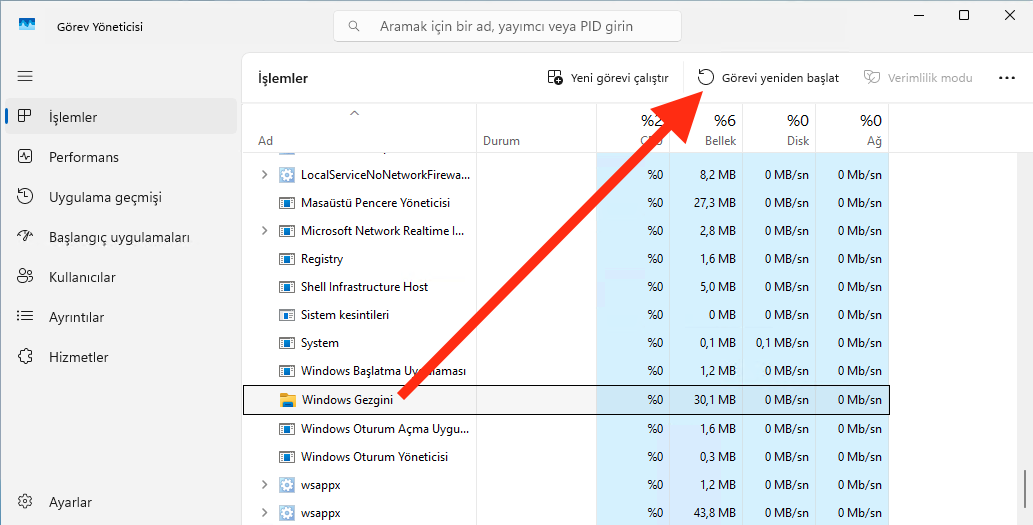
Bilgisayarınızdan powershell açtıktan sonra aşağıdaki kodu çalıştırın ve görev yöneticisinden Windows Gezgini’ni yeniden başlatın

PowerShell nasıl açılır?

PowerShell’e yapıştırılacak kod;

reg add "HKCU\Software\Classes\CLSID\{86ca1aa0-34aa-4e8b-a509-50c905bae2a2}\InprocServer32" /f /ve